2026-02-12 17:19:14 +08:00
# Page Agent
2025-09-29 17:47:15 +08:00
2026-01-17 15:48:30 +08:00
<picture>
2026-06-26 00:55:15 +08:00
<source media="(prefers-color-scheme: dark)" srcset="https://page-agent.github.io/assets/readme/banner-dark.png">
<img alt="Page Agent Banner" src="https://page-agent.github.io/assets/readme/banner-light.png">
2026-01-17 15:48:30 +08:00
</picture>
2025-09-29 16:33:15 +08:00
2026-07-06 16:53:43 +08:00
[](https://github.com/alibaba/page-agent/actions/workflows/ci.yml)
[](https://www.npmjs.com/package/page-agent)
[](https://www.npmjs.com/package/page-agent)
[](https://bundlephobia.com/package/page-agent)
[](https://opensource.org/licenses/MIT)
[](http://www.typescriptlang.org/)
[](https://chromewebstore.google.com/detail/page-agent-ext/akldabonmimlicnjlflnapfeklbfemhj)
[](https://github.com/alibaba/page-agent)
2025-09-29 16:33:15 +08:00
2025-10-23 20:41:12 +08:00
纯 JS 实现的 GUI agent。使用自然语言操作你的 Web 应用。无须后端、客户端、浏览器插件。
2025-09-29 16:33:15 +08:00
2026-07-06 16:53:43 +08:00
<a href="https://trendshift.io/repositories/22551?utm_source=repository-badge&utm_medium=badge&utm_campaign=badge-repository-22551" target="_blank" rel="noopener noreferrer"><img src="https://trendshift.io/api/badge/repositories/22551" alt="alibaba%2Fpage-agent | Trendshift" width="180"/></a>
2026-02-24 00:13:36 +08:00
🌐 [English ](../README.md ) | **中文**
2025-09-29 16:33:15 +08:00
2026-03-16 19:45:14 +08:00
<a href="https://alibaba.github.io/page-agent/" target="_blank"><b>🚀 Demo</b></a> | <a href="https://alibaba.github.io/page-agent/docs/introduction/overview" target="_blank"><b>📖 Docs</b></a> | <a href="https://news.ycombinator.com/item?id=47264138" target="_blank"><b>📢 HN Discussion</b></a> | <a href="https://x.com/simonluvramen" target="_blank"><b>𝕏
2025-09-29 16:33:15 +08:00
2026-06-11 21:40:01 +08:00
<!-- demo video -->
2026-07-06 16:53:43 +08:00
[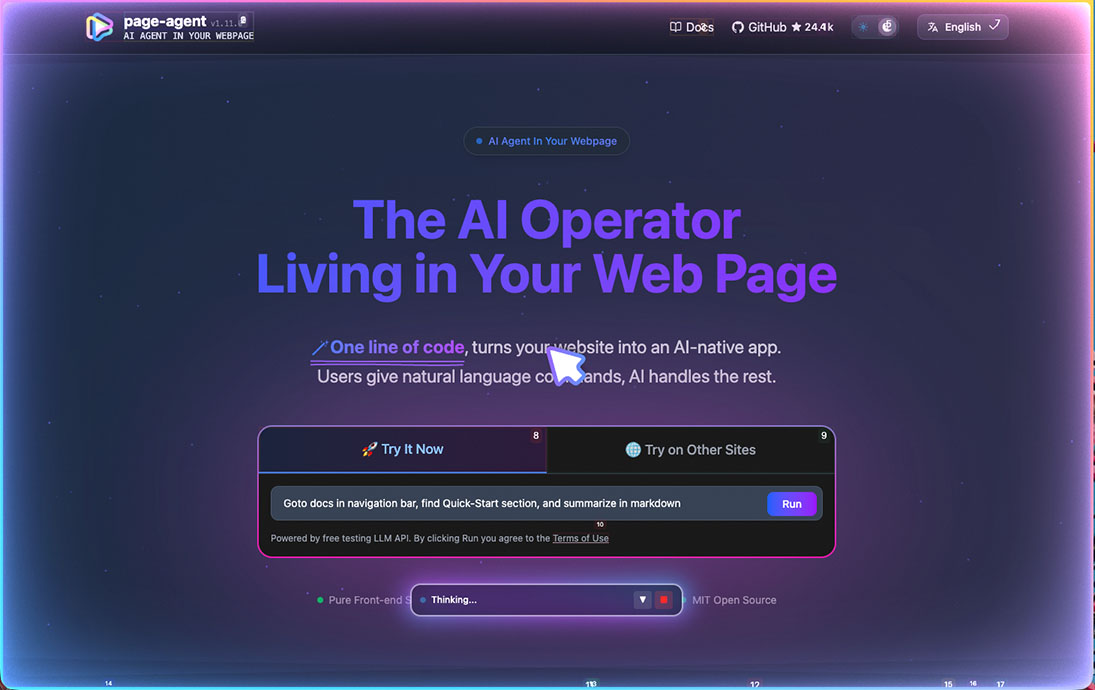](https://github.com/user-attachments/assets/a1f2eae2-13fb-4aae-98cf-a3fc1620a6c2)
2025-10-24 16:56:26 +08:00
2025-09-29 16:33:15 +08:00
---
## ✨ Features
2026-02-24 00:13:36 +08:00
- **🎯 轻松集成**
2026-03-22 03:21:33 +08:00
- 无需 `浏览器插件` / `Python` / `无头浏览器` ,纯页面内 JavaScript
2026-02-12 17:19:14 +08:00
- **📖 基于文本的 DOM 操作**
2026-03-22 03:21:33 +08:00
- 无需截图,无需多模态模型或特殊权限
- **🧠 自备 LLM**
2026-07-06 16:53:43 +08:00
- 支持多数主流模型,包括本地部署模型。参见[支持的模型 ](https://alibaba.github.io/page-agent/docs/features/models )。
2026-03-22 03:21:33 +08:00
- 🐙 可选的 [Chrome 扩展 ](https://alibaba.github.io/page-agent/docs/features/chrome-extension ),支持跨页面任务
- [MCP Server (Beta) ](https://alibaba.github.io/page-agent/docs/features/mcp-server )
2025-09-29 16:33:15 +08:00
2026-02-14 18:54:43 +08:00
## 💡 应用场景
2026-03-22 03:21:33 +08:00
- **SaaS AI Copilot** — 几行代码为你的产品加上 AI 副驾驶,无需重写后端。
2026-02-14 18:54:43 +08:00
- **智能表单填写** — 把 20 次点击变成一句话。ERP、CRM、管理后台的最佳拍档。
- **无障碍增强** — 用自然语言让任何网页无障碍。语音指令、屏幕阅读器,零门槛。
2026-03-27 19:23:31 +08:00
- **跨页面 Agent** — 通过可选的 [Chrome 扩展 ](https://alibaba.github.io/page-agent/docs/features/chrome-extension ),让你自己的 Web Agent 跨标签页工作。
- 通过 MCP 为现有 Agent 加入浏览器控制能力。
2026-02-14 18:54:43 +08:00
2025-09-29 16:33:15 +08:00
## 🚀 快速开始
2026-01-21 20:15:33 +08:00
### 一行代码集成
2026-01-14 17:27:35 +08:00
2026-01-21 20:15:33 +08:00
通过我们免费的 Demo LLM 快速体验 PageAgent:
2026-01-14 17:27:35 +08:00
```html
2026-07-06 16:53:43 +08:00
< script src = "https://cdn.jsdelivr.net/npm/page-agent@1.11.0/dist/iife/page-agent.demo.js" crossorigin = "anonymous" ></ script >
2026-01-14 17:27:35 +08:00
```
2026-03-12 01:05:24 +08:00
> **⚠️ 仅用于技术评估。** 该 Demo CDN 使用了免费的[测试 LLM API](https://alibaba.github.io/page-agent/docs/features/models#free-testing-api),使用即表示您同意其[条款](https://github.com/alibaba/page-agent/blob/main/docs/terms-and-privacy.md)。
2026-06-15 22:59:34 +08:00
| Mirrors | URL |
| ------- | ----------------------------------------------------------------------------------- |
2026-07-03 23:57:03 +08:00
| Global | https://cdn.jsdelivr.net/npm/page-agent@1 .11.0/dist/iife/page-agent.demo.js |
| China | https://registry.npmmirror.com/page-agent/1.11.0/files/dist/iife/page-agent.demo.js |
2026-01-14 17:27:35 +08:00
2026-05-11 19:28:49 +08:00
在 URL 后添加 `?autoInit=false` 可只加载脚本,不自动创建 Demo Agent;之后可通过 `new window.PageAgent(...)` 手动初始化。
2026-01-17 14:59:09 +08:00
### NPM 安装
2025-09-29 16:33:15 +08:00
```bash
npm install page-agent
```
```javascript
import { PageAgent } from 'page-agent'
const agent = new PageAgent ({
2026-02-24 00:59:42 +08:00
model : 'qwen3.5-plus' ,
baseURL : 'https://dashscope.aliyuncs.com/compatible-mode/v1' ,
2026-01-17 16:15:36 +08:00
apiKey : 'YOUR_API_KEY' ,
language : 'zh-CN' ,
2025-09-29 16:33:15 +08:00
})
2025-10-22 16:30:37 +08:00
await agent . execute ( '点击登录按钮' )
2025-09-29 16:33:15 +08:00
```
2026-02-27 19:46:44 +08:00
更多编程用法,请参阅 [📖 文档 ](https://alibaba.github.io/page-agent/docs/introduction/overview )。
2026-01-14 17:27:35 +08:00
2025-09-29 16:33:15 +08:00
## 🤝 贡献
2026-03-24 17:42:56 +08:00
欢迎社区贡献!请参阅 [CONTRIBUTING.md ](../CONTRIBUTING.md ) 了解安装与贡献指南。
2026-03-27 19:23:31 +08:00
提交 issue 或 PR 之前,请先阅读[作者声明 ](https://github.com/alibaba/page-agent/issues/349 )和[行为准则 ](CODE_OF_CONDUCT.md )。
2025-09-29 16:33:15 +08:00
2026-03-27 19:23:31 +08:00
我们不接受未经实质性人类参与、完全由 Bot 或 Agent 自动生成的代码。
2025-09-29 16:33:15 +08:00
2026-07-06 16:53:43 +08:00
用 PageAgent 做了有趣的东西?欢迎到 [Show and Tell ](https://github.com/alibaba/page-agent/discussions/categories/show-and-tell ) 分享。🙌
2026-03-27 19:23:31 +08:00
## 👏 声明与致谢
2025-09-29 16:33:15 +08:00
2026-01-17 14:59:09 +08:00
本项目基于 ** [`browser-use` ](https://github.com/browser-use/browser-use )** 的优秀工作构建。
2025-09-29 16:33:15 +08:00
2026-01-17 14:59:09 +08:00
`PageAgent` 专为**客户端网页增强**设计,不是服务端自动化工具。
2025-09-29 16:33:15 +08:00
2025-10-10 17:20:14 +08:00
```
2025-10-22 16:30:37 +08:00
DOM processing components and prompt are derived from browser-use:
2025-10-10 17:20:14 +08:00
2026-03-12 01:05:24 +08:00
Browser Use <https://github.com/browser-use/browser-use>
2025-10-10 17:20:14 +08:00
Copyright (c) 2024 Gregor Zunic
Licensed under the MIT License
We gratefully acknowledge the browser-use project and its contributors for their
excellent work on web automation and DOM interaction patterns that helped make
this project possible.
```
2025-09-29 16:33:15 +08:00
2026-03-27 19:23:31 +08:00
## ⚖️ 许可证
2026-01-17 14:59:09 +08:00
2026-02-24 00:13:36 +08:00
[MIT License ](../LICENSE )
2026-01-17 14:59:09 +08:00
2025-10-09 23:37:23 +08:00
** ⭐ 如果觉得 PageAgent 有用或有趣,请给项目点个星!**
