 seanturner83
60abc09ff9
seanturner83
60abc09ff9
* fix: wrap acompletion in asyncio.wait_for to prevent indefinite hangs

litellm's timeout parameter doesn't always propagate to the underlying
httpx transport for Bedrock converse streaming. When Bedrock accepts the
TCP connection but never starts streaming chunks, the acompletion call
hangs indefinitely with all connections in CLOSED state.

This wraps the acompletion call in asyncio.wait_for() using the
configured LLM_TIMEOUT (default 300s). TimeoutError is already retryable
via _should_retry (status_code=None), so the retry loop handles it.

Diagnosed via faulthandler thread dump showing the main asyncio event
loop blocked in selectors.select() with no pending callbacks.

Co-Authored-By: Claude Opus 4.6 <noreply@anthropic.com>

* fix: add per-chunk timeout to streaming loop

Addresses review feedback: the initial asyncio.wait_for only guards the
acompletion call. If Bedrock returns headers but stalls mid-stream, the
async for loop could still hang indefinitely.

Replaces async for with explicit __anext__ calls wrapped in
asyncio.wait_for, using the same configured timeout. Mid-stream stalls
now raise TimeoutError and trigger the existing retry logic.

Co-Authored-By: Claude Opus 4.6 <noreply@anthropic.com>

---------

Co-authored-by: Sean Turner <sean.turner@zerohash.com>
Co-authored-by: Claude Opus 4.6 <noreply@anthropic.com>

Strix
Open-source AI hackers to find and fix your app’s vulnerabilities.







Tip
New! Strix integrates seamlessly with GitHub Actions and CI/CD pipelines. Automatically scan for vulnerabilities on every pull request and block insecure code before it reaches production - Get started with no setup required.
Strix Overview
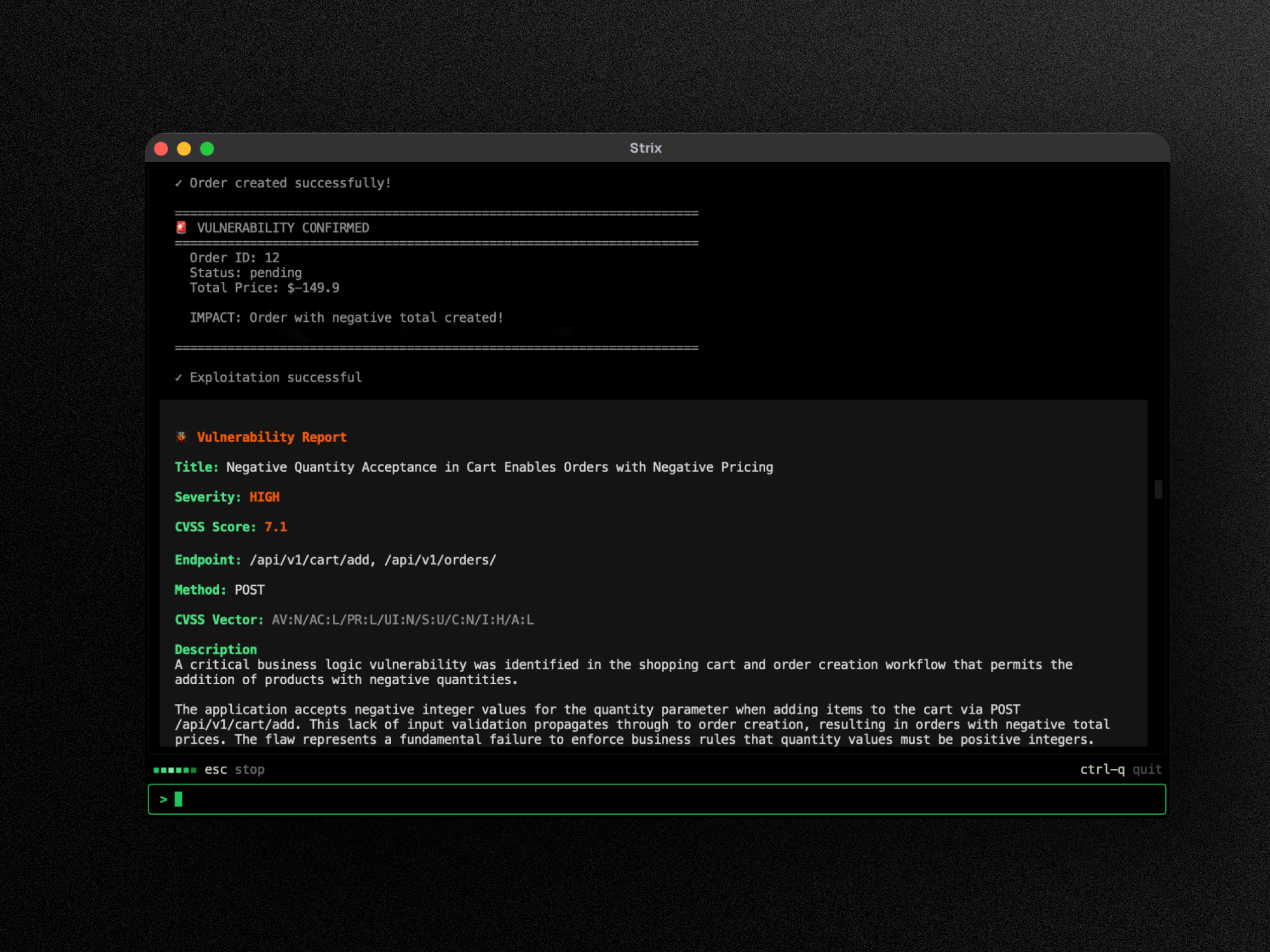
Strix are autonomous AI agents that act just like real hackers - they run your code dynamically, find vulnerabilities, and validate them through actual proof-of-concepts. Built for developers and security teams who need fast, accurate security testing without the overhead of manual pentesting or the false positives of static analysis tools.
Key Capabilities:
- Full hacker toolkit out of the box
- Teams of agents that collaborate and scale
- Real validation with PoCs, not false positives
- Developer‑first CLI with actionable reports
- Auto‑fix & reporting to accelerate remediation
Use Cases
- Application Security Testing - Detect and validate critical vulnerabilities in your applications
- Rapid Penetration Testing - Get penetration tests done in hours, not weeks, with compliance reports
- Bug Bounty Automation - Automate bug bounty research and generate PoCs for faster reporting
- CI/CD Integration - Run tests in CI/CD to block vulnerabilities before reaching production
🚀 Quick Start
Prerequisites:
- Docker (running)
- An LLM API key from any supported provider (OpenAI, Anthropic, Google, etc.)
Installation & First Scan
# Install Strix
curl -sSL https://strix.ai/install | bash

# Configure your AI provider
export STRIX_LLM="openai/gpt-5.4"
export LLM_API_KEY="your-api-key"

# Run your first security assessment
strix --target ./app-directory
Note
First run automatically pulls the sandbox Docker image. Results are saved to
strix_runs/<run-name>
☁️ Strix Platform
Try the Strix full-stack security platform at app.strix.ai — sign up for free, connect your repos and domains, and launch a pentest in minutes.
- Validated findings with PoCs and reproduction steps
- One-click autofix as ready-to-merge pull requests
- Continuous monitoring across code, cloud, and infrastructure
- Integrations with GitHub, Slack, Jira, Linear, and CI/CD pipelines
- Continuous learning that builds on past findings and remediations
✨ Features
Agentic Security Tools
Strix agents come equipped with a comprehensive security testing toolkit:
- Full HTTP Proxy - Full request/response manipulation and analysis
- Browser Automation - Multi-tab browser for testing of XSS, CSRF, auth flows
- Terminal Environments - Interactive shells for command execution and testing
- Python Runtime - Custom exploit development and validation
- Reconnaissance - Automated OSINT and attack surface mapping
- Code Analysis - Static and dynamic analysis capabilities
- Knowledge Management - Structured findings and attack documentation
Comprehensive Vulnerability Detection
Strix can identify and validate a wide range of security vulnerabilities:
- Access Control - IDOR, privilege escalation, auth bypass
- Injection Attacks - SQL, NoSQL, command injection
- Server-Side - SSRF, XXE, deserialization flaws
- Client-Side - XSS, prototype pollution, DOM vulnerabilities
- Business Logic - Race conditions, workflow manipulation
- Authentication - JWT vulnerabilities, session management
- Infrastructure - Misconfigurations, exposed services
Graph of Agents
Advanced multi-agent orchestration for comprehensive security testing:
- Distributed Workflows - Specialized agents for different attacks and assets
- Scalable Testing - Parallel execution for fast comprehensive coverage
- Dynamic Coordination - Agents collaborate and share discoveries
Usage Examples
Basic Usage
# Scan a local codebase
strix --target ./app-directory

# Security review of a GitHub repository
strix --target https://github.com/org/repo

# Black-box web application assessment
strix --target https://your-app.com
Advanced Testing Scenarios
# Grey-box authenticated testing
strix --target https://your-app.com --instruction "Perform authenticated testing using credentials: user:pass"

# Multi-target testing (source code + deployed app)
strix -t https://github.com/org/app -t https://your-app.com

# White-box source-aware scan (local repository)
strix --target ./app-directory --scan-mode standard

# Focused testing with custom instructions
strix --target api.your-app.com --instruction "Focus on business logic flaws and IDOR vulnerabilities"

# Provide detailed instructions through file (e.g., rules of engagement, scope, exclusions)
strix --target api.your-app.com --instruction-file ./instruction.md

# Force PR diff-scope against a specific base branch
strix -n --target ./ --scan-mode quick --scope-mode diff --diff-base origin/main
Headless Mode
Run Strix programmatically without interactive UI using the -n/--non-interactive flag—perfect for servers and automated jobs. The CLI prints real-time vulnerability findings, and the final report before exiting. Exits with non-zero code when vulnerabilities are found.
strix -n --target https://your-app.com
CI/CD (GitHub Actions)
Strix can be added to your pipeline to run a security test on pull requests with a lightweight GitHub Actions workflow:
name: strix-penetration-test

on:
  pull_request:

jobs:
  security-scan:
    runs-on: ubuntu-latest
    steps:
      - uses: actions/checkout@v6
        with:
          fetch-depth: 0

      - name: Install Strix
        run: curl -sSL https://strix.ai/install | bash

      - name: Run Strix
        env:
          STRIX_LLM: ${{ secrets.STRIX_LLM }}
          LLM_API_KEY: ${{ secrets.LLM_API_KEY }}

        run: strix -n -t ./ --scan-mode quick
Tip
In CI pull request runs, Strix automatically scopes quick reviews to changed files. If diff-scope cannot resolve, ensure checkout uses full history (
fetch-depth: 0) or pass--diff-baseexplicitly.
Configuration
export STRIX_LLM="openai/gpt-5.4"
export LLM_API_KEY="your-api-key"

# Optional
export LLM_API_BASE="your-api-base-url"  # if using a local model, e.g. Ollama, LMStudio
export PERPLEXITY_API_KEY="your-api-key"  # for search capabilities
export STRIX_REASONING_EFFORT="high"  # control thinking effort (default: high, quick scan: medium)
Note
Strix automatically saves your configuration to
~/.strix/cli-config.json, so you don't have to re-enter it on every run.
Recommended models for best results:
- OpenAI GPT-5.4 —
openai/gpt-5.4 - Anthropic Claude Sonnet 4.6 —
anthropic/claude-sonnet-4-6 - Google Gemini 3 Pro Preview —
vertex_ai/gemini-3-pro-preview
See the LLM Providers documentation for all supported providers including Vertex AI, Bedrock, Azure, and local models.
Enterprise
Get the same Strix experience with enterprise-grade controls: SSO (SAML/OIDC), custom compliance reports, dedicated support & SLA, custom deployment options (VPC/self-hosted), BYOK model support, and tailored agents optimized for your environment. Learn more.
Documentation
Full documentation is available at docs.strix.ai — including detailed guides for usage, CI/CD integrations, skills, and advanced configuration.
Contributing
We welcome contributions of code, docs, and new skills - check out our Contributing Guide to get started or open a pull request/issue.
Join Our Community
Have questions? Found a bug? Want to contribute? Join our Discord!
Support the Project
Love Strix? Give us a ⭐ on GitHub!
Acknowledgements
Strix builds on the incredible work of open-source projects like LiteLLM, Caido, Nuclei, Playwright, and Textual. Huge thanks to their maintainers!
Warning
Only test apps you own or have permission to test. You are responsible for using Strix ethically and legally.